Showing posts with label Spice Mobile Volcano Tool. Show all posts

Monday, February 2, 2015

Spice M-6800 Format Success With Volcano Tool - USB Mode


How to format Spice M6800 with volcano tool? the below is the complete process to format the phone with volcano tool using USB cable. See the below details to format the phone and other software issues, i.e. read flash, write flash etc.


Spice M-6800 after switch ON the display light is blinking Solution, if you have face this problem of blinking display light then flash the phone of format the phone, it will OK and work fine for me.

Spice M-6800 Format Done Volcano Tool
  • Open volcano tool
  • Go to MTK tab
  • Select boot 11
  • Tick on USB Mode
  • Click Run
  • Now connect the phone to PC holding the Center Button of M-6800


Spice M-6800 Format and Blinking Light Solutions
M-6800 volcano log:
Hardware version:8A02
  Software version:8A00
  CPU TYPE:6236
  Internal version:0000
  Boot downloading complete!
  Flash ID: 009800B100000055
  Flash Type: NAND_TC58NYG0S8C          
  Chip Capacity: 0x8000000(128MB)
  Baud adjust...complete.
  Flash reading complete!
  Spend time: 92.5 s
Wednesday, December 17, 2014

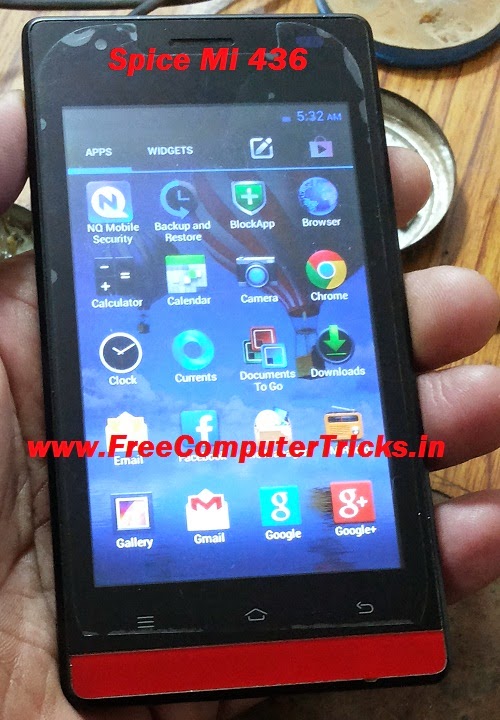
Spice Mi-436 Flash Done With SP Flash Tool


How to flash Spice Mi 436? The Spice Mi-436 can be flashed with Smartphone Flash tool (SP Flash Tool). Download the Spice Mi-436 Firmware and flash the phone using SP flash tool, it's easy and simple. To flash the phone please see the below details and step by step information which helps you flash the phone using SP Flash tool.

Spice Mi 436 flash success with sp flash tool


Download
SP_Flash_Tool_v3.1320.0.174.rar
Spice MI-436 Firmware/Flash File

How to Flash Spice Mi436 With SP Flash Tool
  • Open Flash Tool
  • Click on Scatter Loading and Select MT6572_Android_scatter.txt (Which can be found in the Firmware Folder)
  • Click on Download
  • Connect the phone using USB Cable to the Computer with Battery


Spice Mi-436 Flash done with SP flash tool

When you see Download OK, disconnect the phone and switch on it. Now the Spice Mi-436 has been flashed successfully.

Wednesday, September 17, 2014

Spice M-5600n Format Success With Volcano Tool


How to flash Spice M-5600n with volcano tool, here is the process to format Spice M5600 with volcano tool. The below is the step by step procedure to flash Spice M-5600n using Volcano Tool and this can be done with USB Cable or USB Mode.

Spice M-5600n Format With Volcano Tool
  • Open volcano tool
  • Go to MTK Tab
  • Select Format
  • Select Boot-11 v5-1232
  • Tick on USB Mode
  • Click on Start and connect the USB Cable to switched off phone


Spice M 5600n format success with volcano tool
Spice M-5600n Format Log Volcano Tool


Analysis of USB port,Please insert phone USB cable.
  Connecting...
  Hardware version:CA01
  Software version:0001
  CPU TYPE:625A
  Internal version:8000
  Boot downloading complete!
  Flash ID: 00EF006000170000
  Flash Type: SF_W25Q64DW               
  Chip Capacity: 0x800000(8MB)
  Baud adjust...complete.
  Format range: Start Address: 0x700000,Format Length :0x100000
  Flash erasing complete!

Monday, September 1, 2014

Spice Mi-349 Format Done With Volcano Tool - Spice Mi349 Hard Reset


Spice Mi-349 hard reset done with Volcano Tool for pattern unlock, Spice Mi-349 format success with volcano tool, see the below details how to hard reset Spice Mi-349 SPD CPU with Volcano Box.

Spice Mi 349 format done with Volcano Tool hard reset
Spice Mi-349 Format With Volcano Tool

  • Open volcano tool
  • Go to SPD Tab
  • Select Boot - 14 (6820/8810)
  • Tick on Format and Auto detect pinouts
  • Connect Spice Mi-349 to Volcano Box
  • Then Click on RUN


SPice Mi-349 format volcano tool v 2-5-8

Volcano Tool Log Spice Mi 349:


Analysis flash internal data successfully.
  Detection initiated...
  Vcc: null
  Gnd: 5
  Analyzing D+ and D-...
  D+ = 3, D- = 2
  Analyzing USB device, please wait...
  Find USB device:SCI USB2Serial (COM12), (VID_1782&PID_4D00)
   
  Internal version: SPRD3
  Boot downloaded.
  Start boot please wait a moment....
  Spreadtrum Boot Block version 1.1
  Boot downloaded.
mtdparts=sprd-nand:256k(spl),512k(2ndbl),256k(params),
512k(vmjaluna),10m(modem),3840k(fixnv),3840k(backupfixnv),5120k(dsp),3840k(runtimenv),10m(boot),10m(recovery),230m(system),150m(userdata),60m(cache),256k(misc),1m(boot_logo),1m(fastboot_logo),3840k(productinfo),512k(kpanic),512k(simlock),10m(intmemory)
  Analysis flash internal data successfully.
>>Set to Factory successfully.

Monday, August 18, 2014

Spice M-6464 MTK 6235 CPU Format Done With Volcano Tool V2.7.7


How to flash or format Spice M6464 MTK 6235 with Volcano tool, see the below steps to format, write flash and read flash Spice M6464 MTK6235 CPU.


spice m 6464 format done with volcano tool v2.7.7

Spice M-6464 Format With Volcano Tool


  • Open Volcano Tool V2.7.7
  • Go to MTK Tab
  • Select Format
  • Tick on Auto Detect Pinouts
  • Select Built-in Auto Boot
  • Click on Start
  • Press the Power Button on Spice M-6464


Spice M-6464 Format Volcano Tool Log:

Detection initiated, connect the phone and power on it...
  Vcc: 9
  Gnd: 2
  Waiting for phone's response,please press Power on/off button. 
  Connecting...
  Hardware version:8A04
  Software version:8A01
  CPU TYPE:6235

  Connecting, please hold on the power key...
  Formatting completed


Spice M-6464 Read Info Volcano Tool Log:

Detection initiated, connect the phone and power on it...
  Vcc: 9
  Gnd: 2
  RX: 7, TX: 5
 
  Connecting...
  Hardware version:8A04
  Software version:8A01
  CPU TYPE:6235
  Internal version:0000
  Boot downloading complete!
  Flash ID: 009800F100900095
  Flash Type: NAND_TC58NVG0S3AFT        
  Chip Capacity: 0x8000000(128MB)

  Mobile phone software version for:1.16
  Baud adjust...complete.
  Read phone information success.

Saturday, April 26, 2014

Spice M 5115 MTK 6252 Format, Read Flash and Write Flash Done With Volcano Tool


How to flash spice M5115 mobile with Volcano Tool? below is the process to write flash, read flash and format spice m5115 mtk phone with volcano tool.


Spice M-5115 MTK 6252 Format Done With Volcano Tool


  • Open Volcano Tool
  • Go to MTK Tab
  • Select Built-in Boot_11
  • Tick on Format
  • Tick on Auto Detect Pinouts
  • Click on Run


Spice M5115 format with volcano tool


Connect Spice M5115 phone with Volcano JIG cable and use Volcano Box power cable and Press Switch on Button


Spice M5115 Boot Key is Power On Button


Spice M-5115 Write Flash With Volcano Tool


Spice M5115 MTK 6252 CPU Write Flash with Volcano Tool


Friday, November 11, 2011

Spice M6868 Specification and Price In India


Spice has launched M6868 3D Interface Mobile handset with 3.5 inch Touch Screen, 3.2 Megapixel Camera, Wi-Fi, Dual SIM and up to 8GB Expandable Memory.This is one of the basic touch screen phone from Spice and now it's available in Indian market or you can also get it through online shopping Mall.

As you know the Spice mobile manufacturer is one of the good mobile manufacturing company and it has more basic touch screen handsets in Indian market as well as Android smartphones also. So here is the specification of Spice M6868 and price in India.
https://www.freecomputertricks.in
Spice M6868 Price in India and Full Phone Specification

Spice M6868 Specification :-

  • Dual SIM GSM 
  • Dual band GSM 900/1800Mhz
  • Display : 3.5-inch Touch Screen
  • 3D User Interface 
  • Camera : 3.2 Megapixel Camera 
  • Video Recording 
  • Music Player
  • FM Radio
  • Video Player 
  • 3.5 mm audio jack 
  • Wi-Fi
  • Bluetooth v2.1
  • Java Technology 
  • Battery 450 Hours Standby and 
  • 4.5 Hours Talk Time
  • Memory Expandable Up to 8GB


Approximate Price of Spice M6868 Rs. 4900/-*

📚 You May Also Like to Read