How to Flash Intex Cloud Fx Mobile Phone Firefox Operating System
Intex Cloud Fx Firefox OS flash done with Upgrade Download Tool, the below is the details about how to flash the phone using flash tool and where to download the firmware for Intex Cloud Fx Mobile phone. The Intex cloud FX has Firefox Operating System and can be flash using the following steps or procedure.
 |
| Intex Cloud Fx Firefox OS Flash Success With Flash Tool |
Downloads
Spreadtrum Upgrade Tool
Intex Cloud Fx Firmware
Intex_CloudFX_V07.pac or Intex_CloudFX_V08_SER.pac as per your mobile S/W version.
How to Flash Intex Cloud Fx Firefox OS
Open UpgradeDownload Tool
Load Packet and Select the Intex CloudFx V07.pac
Click on Start
Now Connect the USB cable to the phone by holding Volume Down
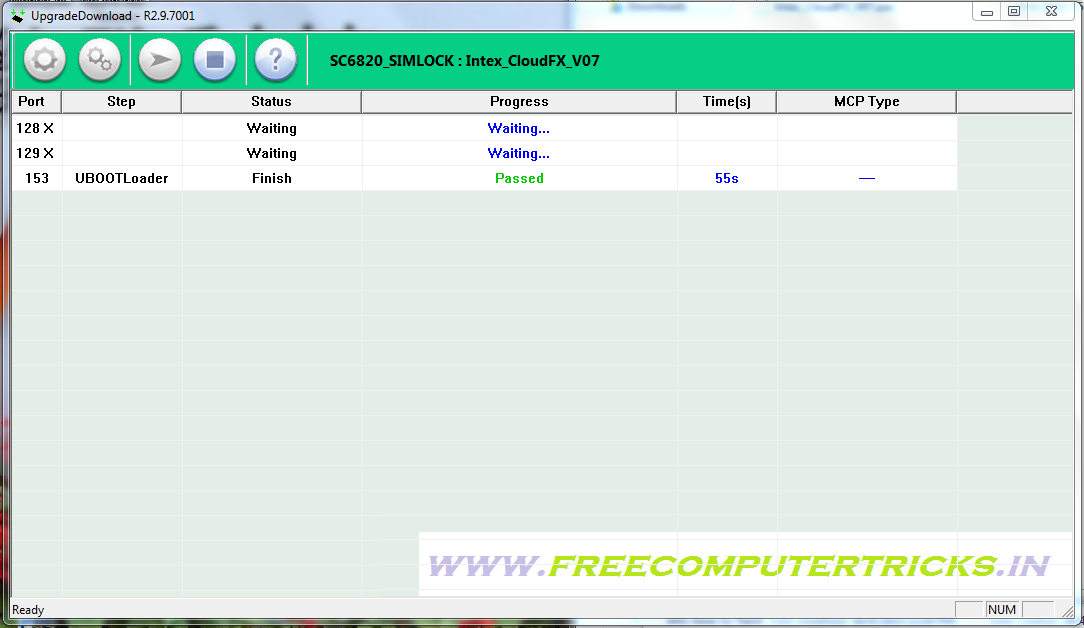 |
| Intex Cloud Fx Flash Done With Flash Tool |


Is there any possibility of flashing other than stock firmwares? I'm interested in flashing FFOS 1.4 for Intex Cloud FX!!!
ReplyDeleteIs there any possibility of flashing other than stock firmware! I'm interested in flashing FFOS V 1.4 for Intex Cloud FX!!!
ReplyDeletehow to flash, volume down + usb connect mobile on, no flash mode spd tool
DeleteFirst check the battery should be charged then hold the volume down key and connect the phone to PC. Install SPD Spreadtrum USB driver and it will work fine.
DeleteIf still the SPD flash tool is not detecting the phone, that means there is some problem in Volume Keys or the handset may have Motherboard issue.
how to solve on set but display red line blinking h
ReplyDelete