How to Add Text Border in Blogger HTML - Colored Left Border with Text Background Color
Hi Welcome to another tutorial from Free Computer Tricks, The tutorial is about HTML coding for Blogger, if you have a blog and want to customize is with various styles using HTML code, then here you can get the HTML tutorial for such customization of your Blog. Here is the tutorial about How to ad text border in Blogger with HTML code. Here is the example of how you can add a left border with color along with any text background color.
If you are a Blogger, then you must need this tutorial about text border. Sometimes you need to add some text lines in your blog such as HTML Codes, CSS Codes, Some Log text, Error Quotes, JavaScript Code, Special Notes etc. and you want to add a style text border and background, which is easily find out by the visitors and also it looks better on your blog. Here we will show you how to add a colored left margin and text background color with various style on your blog.
Here we will show you how to add a Colored Left Border and some text background color with text align, padding, font style, left border color, text background color and margin. To add this style text box on your blog you need to edit your blog post with HTML Mode and paste the below HTML codes in it then come back Compose Mode.
Example:
HTML Code:
Result:
HTML Code: Change the Color of the Left Border
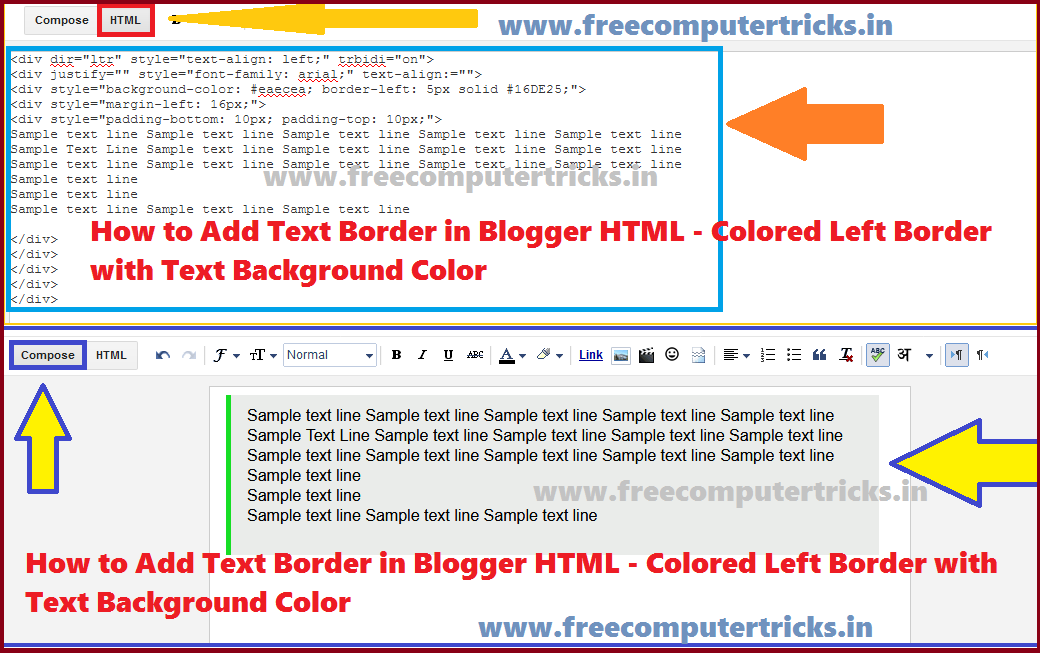 |
| How to Add Text Border in Blogger HTML - Colored Left Border with Text Background Color (HTML Code For Blog and Website) |
Here we will show you how to add a Colored Left Border and some text background color with text align, padding, font style, left border color, text background color and margin. To add this style text box on your blog you need to edit your blog post with HTML Mode and paste the below HTML codes in it then come back Compose Mode.
Example:
HTML Code:
<div style="border-left: 4px solid red; background-color: lightgrey;">
Sample text line 1
Sample Text Line 2
</div>
Sample text line 1
Sample Text Line 2
</div>
Result:
Sample text line 1
Sample Text Line 2
Sample Text Line 2
HTML Code: Change the Color of the Left Border
<div style="background-color: lightgrey; border-left: 5px solid #16DE25;">
Sample text line 1
Sample Text Line 2
</div>
Sample text line 1
Sample Text Line 2
</div>
Result:
Sample text line 1
Sample Text Line 2
Sample Text Line 2
HTML Code: Add Space After Left Border
<div style="background-color: lightgrey; border-left: 5px solid #16DE25;">
<div style="margin-left: 15px;">
Sample text line 1
Sample Text Line 2
</div></div>
<div style="margin-left: 15px;">
Sample text line 1
Sample Text Line 2
</div></div>
Result:
Sample text line 1
Sample Text Line 2
Sample Text Line 2
HTML Code: Padding Top and Bottom
<div style="background-color: #EAECEA; border-left: 5px solid #16DE25;">
<div style="margin-left: 15px;">
<div style="padding-bottom: 15px; padding-top: 15px;">
Sample text line 1
Sample Text Line 2
</div>
</div>
</div>
<div style="margin-left: 15px;">
<div style="padding-bottom: 15px; padding-top: 15px;">
Sample text line 1
Sample Text Line 2
</div>
</div>
</div>
Result:
Sample text line 1
Sample Text Line 2
Sample Text Line 2
HTML Code: Font Style and Text Align
<div style="font-family: arial; "text-align: justify;">
<div style="background-color: #EAECEA; border-left: 5px solid #16DE25;">
<div style="margin-left: 15px;">
<div style="padding-bottom: 15px; padding-top: 15px;">
Sample text line 1
Sample Text Line 2
</div>
</div>
</div></div>
<div style="background-color: #EAECEA; border-left: 5px solid #16DE25;">
<div style="margin-left: 15px;">
<div style="padding-bottom: 15px; padding-top: 15px;">
Sample text line 1
Sample Text Line 2
</div>
</div>
</div></div>
Result:
Sample text line 1
Sample Text Line 2
Sample Text Line 2
Conclusion:
In this way you can add a decorated text border with a background color, which make your blog to looks better and it's also easy to find out by your visitor if there is any special note on your blog. So use the above HTML codes for border and text background and enjoy.


0 comments:
Post a Comment
Please Share Your Thoughts