Showing posts with label Mi Account Unlock. Show all posts

Tuesday, April 24, 2018

How to Remove Mi Account or Reset FRP Mi Max 2


As we know Mi Max 2 from Xiaomi has released on June, 2017 and it has IPS LCD capacitive touchscreen, 16M colors, 6.44 inches Display with Android 7.1.1 (Nougat) Operating System and runs on Qualcomm MSM8953 Snapdragon 625 chipset. The phone also has Octa-core 2.0 GHz Cortex-A53 CPU and Adreno 506 GPU with 4 GB RAM and with Internal Storage of 32/64/128 and you can also expand external storage up to 256 GB and comes with MIUI (Mi User Interface)  MIUI 8.0 up to 8.5 and here is the tutorial about how you can unlock Mi account or reset frp lock on the Mi Max 2 smart phone.
How to Remove Mi Account or Reset FRP Mi Max 2 using Miracle Box
How to Reset FRP LOCK REMOVE DONE WITH FASTBOOT MODE?

Definition Applied
Connecting to Phone,Wait..ok
Wipe data...
erasing 'userdata'... OKAY

Done.
Definition Applied
Connecting to Phone,Wait..ok

Wipe cache...
erasing 'cache'... OKAY
Done.
Definition Applied
Exit fastboot...

Connecting to Phone,Wait..ok
>>Done.


How to Reset or Unlock Mi Account of Mi Max 2 - Miracle Box?
  • Download Miracle Box Free Working without Box Here.
  • Open Miracle Box
  • Go to Android Tab and then select Home ADB
  • Now select "Wipe User Data" under the Fastboot Mode option
  • Now put the Mi Max 2 phone to Fastboot mode (Volume Down + Power Key).
  • Then click on Start button and wait until the process complete.

Thursday, April 12, 2018

All MIUI 9 Mi Account Unlock Solution


Here you will know how to unlock Xiaomi Redmi Mi cloud verification account having latest MIUI 9 on the Redmi phone. As you know now most of the Xiaomi phone has the latest MIUI update which is MIUI 9, you can get the OTA update of you phone by visiting the Mi official site and you can also use your phone to search latest MIUI update through the update online feature of the phone. When you hard reset or factory reset the Mi phone having MIUI 9 it will difficult to bypass the Mi cloud account and it will ask to enter the Mi account details to go further and use the phone. Mi MIUI 9 Mi account frp and unlock solution is given in this article, so please go through the topic and know how to remove/bypass/unlock/frp of the MIUI 9.


MIUI 9 Xiaomi Redmi Mi FRP Free Unlock Solutions

MIUI 9 Mi Account Unlock Solution:

So today we will discuss how to unlock or bypass or remove Xiaomi Redmi Mi cloud account? there are various methods available on the internet to unlock MIUI 9 mi account, but most of those methods are failed to unlock the phone, after a long research we will find the 100% working solution to unlock mi account runs on latest MIUI 9 of the Xiaomi Android 7.0 Nougat phones. This process or method includes a small trick, which is downgrade the operating system of the xiaomi mi phones, that means downgrade the phone with respective fastboot/edl mode ROM then it will erase the Xiaomi Redmi Mi account for you. To use this method you need to download the old stable fastboot ROM for Mi phone which is MIUI 8 with Android 6.0 Marshmallow.

Most of the people download the wrong firmware for their Mi phone, as you know you need fastboot ROM and Mi Flash Tool to Unlock Mi account by flashing the phone using EDL Mode. So before you start please find the correct firmware ROM for the Mi phone and then flash it and downgrade to unlock Mi phones. Remember to download Fastboot ROM not the Recovery mode ROM for the Xiaomi phone.

You May Like These Links Below:-

How to Unlock MIUI 9 Mi Account Free?
  • Download Mi Fastboot ROM as per the Phone's Model Number.
  • Download Latest Mi Flash Tool (Xiaomi Mi Flash Tool 2017425).
  • Boot the Mi Phone into EDL Mode or Fastboot Mode (if supports Fastboot Flashing).
  • For Xioami EDL Mode Test Point You Can Visit [Mi EDL Mode Solution]
  • Connect the phone to PC and Install Mi EDL Mode USB Driver [Mi Driver Download] or [All Mi USB Driver Download]
  • Extract the Fastboot ROM (Use 7zip to extract)
  • Open the Mi Flash tool and select the Mi ROM folder.
  • Now click on Refresh  and then select "Clean All and Lock" or "Flash_All_Lock.bat"
  • Then click on Flash and wait until the process complete.
Xiaomi Redmi MIUI 9 Mi Account Unlock Solved - Mi FRP, Mi Unlock Tool, Mi Account Bypass and MIUI 9 Unlock Tool

Note: After downgrade to MIUI 9 to MIUI 8 the phone takes 5 to 10 minutes to complete the switch on process, so please have patience.

Note: Before Flashing please take a backup of your important data.

Monday, April 9, 2018

Redmi Note 4X MIUI 9 Mi Account Unlock Solution


How to unlock mi account/bypass mi account/redmi frp unlock of Xiaomi Redmi 4 2016100? If you are searching for unlocking/bypass mi account of the Redmi 4X with easy method, then you are in right place here you will know how to unlock mi account runs on latest MIUI 9 version. If you have updated the Xiaomi phone to MIUI 9 and if you hard reset the phone it will ask to enter the Mi cloud account and password previously used in the phone and if you forgot the mi account id and password, then you may unable to use the phone, but after going through this topic you can find the proper way to unlock the latest MIUI 9 of your Xiaomi Redmi 4X and here is the tutorial about Mi account unlock/bypass and Mi frp unlock of Xiaomi Redmi Note 4 2016100. Mi unlock tool, mi account bypass tool and mi account frp unlock tool, use the following steps below in this article.


MIUI 9 Redmi Note 4X Mi Account Unlock 100% Solved

MIUI 9 Global Public Beta ROM Supported Devices:
 

MIUI 9 is now available for Mi MIX 2, Redmi Note 4 MTK, Redmi Note 4 Qualcomm/Redmi Note 4X, Mi 6, Mi Note 2, Mi 5, Mi 5s, Mi 5s Plus, Mi Max, Mi Max Prime, Mi Max 2, Mi 3, Mi 4, Redmi 3, Redmi 3S, Redmi Note 3 Qualcomm, Redmi Note 3 Special Edition, Redmi Note 2, Redmi 4/4X, Redmi 4A, Redmi Note 5A/Y1 Lite, Redmi Note 5A Prime/Y1.


MIUI 9 Global Beta ROM Download Links

MIUI 9 Global Beta ROM 8.2.1 Download Links

MIUI 9 Global Stable ROM For Redmi Note 4X India:

Now most of the Redmi device can get the latest MIUI 9 with Android 7.1 Nougat, The Redmi 4 Global (India Version) users has a Excited news, After a long time, Most awaited MIUI 9 Global Stable ROM for Redmi 4 Global (India Version) Released. Here comes the MIUI 9 Global Beta ROM V9.1.1.0.NAMMIEI with Android Nougat 7.1 for Redmi 4 Global (India Version). It's time to update your phone.


MIUI 9 Global Stable ROM Download Links

MIUI 9 Global Stable ROM Download Links

Note: This ROM is not for Redmi 4 Prada/Prime/4A (According to the Official Mi Website)

MIUI 9 Global Stable ROM For Redmi Note 4X

How to Unlock Mi Account on Redmi Note 4X?

  • Download MIUI Global Stable ROM [Visit This Link]
  • Download Mi Flash Tool 2018 [Mi Flash Tool Link]
  • Now put the Mi Note 4 into EDL Mode [Visit For EDL Mode Note 4]
  • Extract the downloaded MIUI ROM (Use WinRAR and then 7zip to extract the file)
  • Open Mi Flash Tool and connect the phone to the Computer.
  • Select "Flash All and Lock" for unlock Mi account/bypass mi account/mi account frp unlock.
  • Then flash the phone and wait until the process is complete.
  • After downgrade to MIUI 8 from MIUI 9 it will take 5 to 10 minutes to complete the switch on process, please do not panic.

ROM Download Information:

Visit the above MIUI 8 Global stable ROM download link and download the below Redmi Note 4 flash file.

mido_global_images_V8.2.10.0.MCFMIDL_20170602.0000.00_6.0_global_dfea5718af.tgz

Note: Please do backup important data before flashing.


So with above tutorial we know how to unlock mi account of Redmi Note 4X having MIUI 9, redmi mi account unlock tool, how to unlock frp lock of mi MIUI 9, redmi note 4 2016100 mi account unlock 100% working, miui9 mi account unlock done without any box, redmi flashing, mi rom download, xiaomi redmi firmware download, xiaomi redmi fastboot ROM download, xiaomi redmi edl mode ROM/firmware download.

Tuesday, April 3, 2018

Download Mi Account Remove Tool 2018 : Remove or Bypass Mi Cloud Verification


Mi account remove or unlock tool Download. If you are using Xiaomi Mi phones and if you forgot the Mi account login details then you might search to bypass/unlock/remove Mi account, so here is the free and 100% working Mi account unlock tool for you, just download the tool and unlock/remove/bypass the Mi account verification. Here is the Mi Account remove tool 100% working and tested and free download to end your search and unlock the Mi account.

What is Mi Account?

As you know Mi account is helps to access Mi cloud, where you can sync your phone's data such as Video, audio, contacts and messages etc. as per the storage limit you provided for free. Mi cloud account helps you to restore and wipe data remotely by login to your Mi account, you can also set other security features such as, it helps to find your lost phone. If you are buying a new Mi phone, then just login using your existing Mi account ID and password, all your old phone data will be synced to the new Mi phone.

Mi Account Remove/Unlock Tool:

Mi account remove tool is small and easy to use tool, which helps you to remove or unlock or bypass Mi account. If you hard reset the Mi phone and forgot your Mi account login details, then this tool will help you to remove the Mi account lock and after unlock you can use a new Mi account. So by using this Mi account remove tool you can unlock Mi cloud account of the device which may associated with existing Mi account.

Supported Operating System:

Mi account remove tool is supports and works on Windows only, To use this Mi account unlock/remove tool, you must have a Computer with Windows operating system. Mi account remove tool supports all most all version of Windows OS such as Windows XP, Vista, 7, 8, 8.1 and 10. So you can run this Mi account remove tool on these platforms to unlock Mi account. The Mi account remove tool is very useful when you forgot the Mi account ID and Password. Please follow the process to know how to unlock Mi cloud account in this topic.

You May Also Like To Read:-

How to Unlock Redmi Note 4 Mi Account?
How to Unlock Redmi Mi 4A (2016116) Mi Account?
How to Unlock/Remove Xiaomi Mi Note 4 (2016100) Mi Account?
How to Unlock Xiaomi Redmi 5A MCI3B Mi Account?
All About Redmi Mi Account Remove or Bypass


How to Use Mi Account Remove Tool?
  • Download Mi account remove tool from the below download link.
  • Open the Mi account remove tool.
  • Switch off the phone and press volume up +Power button.
  • Then chose the recovery mode and connect the phone to PC.
  • Now open "Mi account unlock tool.exe" from the Mi account unlock tool folder.
  • Now click on "INFORMATION" if the tool get the phone information, that means the Mi phone is connected to the PC properly.
  • Now click on Bypass Mi Account.
  • After unlock successfully the phone will reboot automatically.
  • Now you have successfully unlocked the Mi account and enjoy.

Download Mi Account Remove Tool - Mi account unlock and bypass tool
 Download Mi Account Remove Tool:

Download the Mi account unlock/remove/bypass tool from the below link and enjoy unlocked Mi account.

Download Mi Account Unlock Tool Here.


 #download mi account unlock tool free #how to unlock mi account #how to unlock,bypass and remove mi cloud account #free mi account remove tool download #mi account frp #mi account tool #mi account unlock tool 2018 #latest mi account unlock tool #mi cloud account verification bypass #mi frp account unlock tool #Xiaomi mi account unlock tool #Xiaomi frp tool free download #Xiaomi Redmi Mi account remove tool #Xiaomi account unlock tool #Xiaomi cloud account unlock tool. 

Monday, April 2, 2018

How to Remove Mi Account Without ReLock Issue With Miracle Box V2.72


Here is the tutorial for the Miracle Box users, how to remove Xiaomi Mi account without re-lock issue. If you are using Miracle Box then please update to the latest beta version 2.72 and unlock Mi account permanently. To use this feature user must be updated to latest version of Miracle Box reloaded V2.72 and follow the below steps.

Mi Account Remove Permanent Solution, as you know if unlock Mi account sometimes it getting locked again when the phone is connected to the Internet, so how you can overcome the problem or chance to re-lock of Mi account, if you are looking for how to remove Mi account without re-lock chance, then using the Miracle Box you can easily do it, please see the below step by step process to unlock Mi account with re-lock issue.

Mi Account Remove Without ReLock Issue With Miracle Box v.2.72
How to Recover Your Mi Account ID and Password?

In case you made a factory reset or hard reset the Mi phone, if will ask to enter the Mi account details i.e. Mi account ID and Password to unlock the phone as well as to use the Mi cloud services. If forgot the Mi account password then click on "Forgot Password" option to recover your Mi account. To recover the Mi account you must give the Mi account user Id (your registered Email Id) and enter the security details you given at the time of register of sign up process of the Mi account but if you forgot both the Mi account user Id and password, it may difficult to recover but using the Miracle Box you can remove/unlock Mi account permanently on the updated Android phone also.
How to Unlock Mi Account Without Re-Lock Chance?

  • Open Miracle Box V2.72
  • Go to Qualcomm Tab then Click on Extra Tab.
  • Put the phone into EDL Mode and connect to the PC.
  • Select the COM Port.
  • Select Mi account Unlock.
  • Now choose the phone Model.
  • Then click on Start Button and wait until the process complete.
 #download mi account unlock tool free #how to unlock mi account #how to unlock,bypass and remove mi cloud account #free mi account remove tool download #mi account frp #mi account tool #mi account unlock tool 2018 #latest mi account unlock tool #mi cloud account verification bypass #mi frp account unlock tool #Xiaomi mi account unlock tool #Xiaomi frp tool free download #Xiaomi Redmi Mi account remove tool #Xiaomi account unlock tool #Xiaomi cloud account unlock tool #Miracle Box #How to use Miracle Box #Mi account unlock miralcle Box #Flashing Tools #Miracle Box Mi account unlock options, frp unlock tool, all in one frp unlock tool download for mi phones, Mediatek frp unlock tool, spd frp unlock tool, qualcomm frp unlock tool, android frp unlock tool free download, frp unlock tool 2018 free download, mi frp unlock tool free download, xiaomi frp unlock redmi mi phone. mtk frp unlock tool, mtk frp unlock tool free download.

Friday, March 30, 2018

Xiaomi Redmi 5A MCI3B Mi Account Unlock - Solved


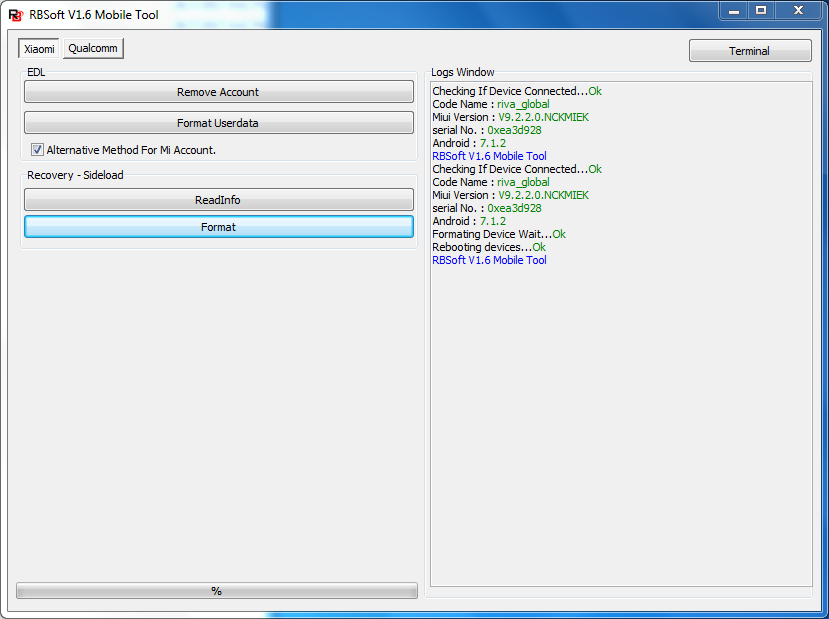
Xiaomi Redmi 5A MCI3B Android 7.1.2 Mi account unlock, how to unlock mi account of Redmi 5A without using any flashing box? Here you can unlock the Mi account of Redmi 5A using RB Soft Tool, unlock Mi account free with RB Soft Tool, to unlock Redmi 5A mi account please follow the below steps. By using this process it will unlock the mi account with doing a hard reset of the Mi phone.

Note: Hard Reset and Mi account unlock must erase your personal data on the phone.
Xiaomi Redmi 5A - How to unlock Mi Account?

Download the RB Soft v1.6 Mobile Tool working, by searching on the Internet and open it using the User ID and Password.

Download RBSoft Mobile Tool v1.6 Full 100% Working : Link

Xiaomi Redmi 5A Mi Account Unlock and Hard Reset:
  • Open RB Soft Mobile Tool.
  • Go to Xiaomi Tab and select Alternative method for Mi Account.
  • Now put the phone into recovery mode (Volume + and Power Key)
  • Connect the phone to PC and click on Format.

Wednesday, December 13, 2017

Free Mi Account Unlock Tool 2017 Download


Here you can download Free Mi Account Unlock Tool latest version and basic tutorial of how to use Mi account Unlock tool 2017 to remove or by pass Mi account on your Xiaomi Mi Android smart phones. This Mi account unlock tool is working on all models of Mi phones.


Mi Account Unlock Tool
Mi Account Unlock Tool Features:
  • You can use this for all MI models.
  • Information 
  • Bypass Mi Account
  • Disable Mi Account
Mi Account Unlock Tool 2017 Software Details:
  • Tool Name: Mi Account Unlock Tool/Mi Account Remove Tool
  • File Size: 3.5 MB
  • Zip File Name: Mi Unlock Tool Download.zip


How to Use this Tool?


  • Open the Mi account Unlock Tool
  • Put the phone into Mi assistance mode
  • Now connect the phone to PC
  • Click on Information to get the connected phone info.
  • Now click on "Bypass Mi Account"
  • You can watch the video from the below link.


Downloads:

Password for the Zip File  is freecomputertricks
Download Mi Account Unlock Tool 2017 Here

Watch Video on YouTube
Xiaomi Mi All in One Mi Account Unlock Tool 2017

📚 You May Also Like to Read